
GRAPHIC:
Mobile Intel(R) 915GM/GMS,910GML Express Chipset Family For Windows 7
Download Link: (last update on Jan 30 2013)
Download (recommended)
Download (mirror)
Note : You can use your original Windows XP or Windows Vista driver. Direct Installation will failed so you need to install base on the installation method described below.
Update:
Microsoft officially announced they no longer continue support for this product and they provide the last XPDM driver on their website. You can also use that driver to install.
INSTALLATION:
First install directly by extracting the driver, and run the igxpun.exe. It will prompt some components are corrupted but you will have maximum resolution after the installation.


IF FAILED??
If failed we need to install it manually:
1. Extract the driver and remember the extracted folder path. We will need it later.
2. Now open device manager by click start and on the search box type DEVMGMT.MSC

3. Device manager will open, right click on standard VGA and select update driver.
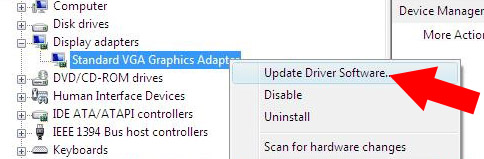
4. Select Browse my computer for driver Software.

5. Select Let me pick from a list of device driver from my computer.

6. Select Have disk and point to the driver we extracted earlier and select the igxp32.inf file.

7. Continue with on screen instruction and ignore if it prompt.reboot.
HOW DO I ENABLE AERO?
You can use third party software to get AERO,
UPDATE:
For Windows 8, Win32_152815.exe reported work with 900 series chipset and able to get maximum resolution. Since Intel website always change the download page URL (like all the time) so you need to search for it (Win32_152815.exe ).
Update 2 - April 4 2014 -
I re-read all the comments from you guys and i think I have to clarify about : failed to play games after successful installation. If you manage to install using the driver I gave but getting several problems such as cannot play games which you normally play in windows XP, or have some bugs and glitch. What you can do to fix that is install your original windows XP drivers using manual installation method. Or use your Vista drivers (if available) and set compatibility mode to windows Vista.
please try :
ReplyDeletehttp://novebeta.blogspot.com/2010/04/driver-mobile-intelr-915gm-gms-dan.html
great...it works...
ReplyDeletei've download the one from mediafire and instaled it.and it works
tks a lot.
how do you install this downloaded driver
ReplyDelete?
ok, after finish download, right click on the downloaded file and select "extract" simply choose desktop as destination. after extracted, open the folder and search for igxpun, double click to run and follow on screen instruction.
ReplyDeleteThank you very much, looked all over till I found this, Have an acer and was hard as hell finding the windows 7 driver version for this mobile intel, loaded and worked great. Thanks much, you made me so happy
ReplyDeleteUnfortunately, I still have problem with my DELL. Guys, could you help me with video driver?
ReplyDeletegracias x su aporte funciona el video en un hp dv 1000 con win7
ReplyDeleteExcelente aporte, estuve buscando este driver durante varias horas y por fin!. Funciona excelente en win7 y pensar que ni en la pagina de soporte de intel me dieron esperanza alguna con mi vieja tarjeta grafica. Muchas gracias!!!
ReplyDeletehi Black x , i've downloaded vga driver for 915GM but after installing it says some componenents were missing and corrupt so plz help me .
ReplyDeletei thinks it is not the suitable drivers, what is your laptop model?
ReplyDeleteGoogle Earth was slow and not clear. I downloaded the driver from mediafire and it worked well. Google Earth is clearer and faster now. Driver Update couldn't find it. Many Thanks :)
ReplyDeleteI forgot to add in the Google earth problem above, that my laptop is an HP NC6220
ReplyDeletethanks for the info =)
ReplyDeleteWorked great on a Dell D610 running W7 with SP1.
ReplyDeleteLooked for awhile to find the Intel 915GM driver for W7
Thanks!
thanks for the feedback =)
ReplyDeleteThis worked on my Dell Latitude X1 with windows 7.
ReplyDeleterunning igxpun.exe directly will give an error saying some file or component is corrupt, but manually installing the driver will do it.
The widescreen resolution can be used instantly even without rebooting first.
Thanks! -Billy
thanks for the feedback
ReplyDeleteThank you a million times black x you helped me solve this driver issue...for me the manual install process worked like a charm!! gr8 work and all the best
ReplyDeleteRT
Thank you , thank you , thank you , thank you !!!!!!!!!!
ReplyDeleteGreetings from Serbia
you are welcome
ReplyDeletethank you very much .....
ReplyDeletemy laptop compaq presario v2000.. work fine... thank you.....
from aceh - indonesia
Thank you very much! I have an old HP nc4200 and it works perfectly!
ReplyDeleteLeo From Malta, after a lot of searches and non working links, your links works FINE!. I have an acer aspire 1640 laptop (oldie but still running) which I installed win7 enterprise (dual boot with xp), with a decent screen resolution PLUS the Intel Graphics Media Accelerator Driver for Mobile application. Thanks.
ReplyDeleteafter 2 years of searching ..... finally .... thanks :D
ReplyDeletewow, 2 years! btw glad it work for ya=)
DeleteThank you my friend for showing me the manual installation.
ReplyDeleteTHANK YOU VERY MUCH.....
ReplyDeleteMY BLOG: http://www.pcprince.co.cc
Beautiful...It works like a charm on my Dell Lattitude D410...Thank you..
ReplyDeleteWOw
ReplyDeleteGreat Technique Thank You Man
Thank you friend
ReplyDeleteIs it possible to do the same thinh in windows 8??? I have already tried everything without sucess..
ReplyDeleteIm not sure, but you can try, for your safety make restore point first.
DeleteIt didn't worked... Thanks anyway
Deletethanks for the feedback and, i really want to try to install it myself, maybe i can tweak the drivers or find other way to install it, unfortunately i don't have any model that use this graphic to test with, btw I'll let you know if i have update on this
Deletei would appreciate... thanks
DeleteIf you want to run it in Windows 8, try to right-click and select "Troubleshoot Compability".. Follow the instructions.. It usually works cause I use Windows 8 in my TOSHIBA Satellite L20. ;)
DeleteThank you for the post.I am currently using windows 7 home-premium 32bit and was not able to find this video driver.
ReplyDeleteo eseguito la guida ed è andato tutto a posto...=)..ti ringrazio di cuore....mi ai aiutato molto...=) grazie...
ReplyDeleteprego =)
DeleteThanks a lot, make my 80 machines upgardable to WIN7 !
ReplyDeletegreat thanksfull
ReplyDeletehave been look around for this driver, and it's really work for me
unfortunatelly nc6220 cant work with win 7 x64 :(
anw, thx
Really very grateful to you. It worked like a charm on my presario v2000 laptop with win7. The first didn't work but the second trick worked. Take care. thanx
ReplyDeleteDear Black,
ReplyDeleteis there a workaround to make this driver work on a win8 x64 - m1450g fujitsu-siemens machine ??
Tx
Have you try your original windows 7 or windows vista 64 bit driver, Install using compatibility mode or manually install via device manager
DeleteThere are no vista or 7 drivers for this chip cause it doesn't support Aero feature, which was introdused later.Only xp .Tried em but wouldn't install in win8.
ReplyDeleteWorks well on Dell Inspiron 6000, but no AERO.
ReplyDeleteThanks! from Bangkok, Thailand.
Welcome, your neighbor, Malaysia =)
DeleteThank you very much, it is working- resolution is 1280x800 now. Intel says they wont update those drivers and yet you have it, that's great. I can keep using my old laptop, thanks again.
ReplyDeleteyou are welcome
DeleteThank you very much. Before I spent a lot of time looking for the driver, but failed to run. Now really solve my problem. My laptop model "Acer Aspire 5500Z" upgrade to Windows 7, it is working-resolution is 1280x800, thanks again.:)
ReplyDeletestill no aero after all this year?
ReplyDeletenot yet =)
DeleteThanks. The driver works perfectly.
ReplyDeleteplease update mediafire download link Black X :)
ReplyDeleteHi Alif, sadly the answer is I can't, I already fix it few times and they keep delete the files, for now you can ask for other alternative (such rapidshare, 4shared etc) links and i will check if I can do that for you
Deleteworks great on w7 but not on w8.i tried it..but nothing...can u make it work for w8?..or can u tell me how u did it?my email : vladdpop@yahoo.com thanks!
ReplyDeleteFor now there are no solution to install 910/915 graphic driver for windows 7. I myself didn't have any information and hardware to test and experiment with it, most of the feedback from testers by using manual installation and force installation end up in failure. I myself interested to mod and tweak the drivers, for now not much i can help, btw I'll let you know if there is a glance of hope to solve this problem =)
DeleteCan you try to make it work for Win8 32 bit?
DeleteMerci beaucoup pour votre post! J'ai télécharger et suivi les instructions, ça a marché à merveille. Merci et du courage.
ReplyDeleteThanks dude. It worked.
ReplyDeleteI need this to work for Windows 8...please someone make it work for 8!!!!
ReplyDeleteThis comment has been removed by the author.
DeleteThanks.. 100% run with my toshiba satelite m50
ReplyDeleteThanks Bro ! :))
ReplyDeleteIf someone could make it for windows8 ? :(
ReplyDeleteworks for video with 720p but lags a lot on 1080p
ReplyDeleteintel graphics GM965 and below cannot handle 1080p especially when multitasking. I myself didn't have a good solution for this except experiment to get the best video player software
Deleteit workkk thnx but neeed aero really need it there is no solution?????
ReplyDeletetry this software:
Deletehttp://www.softpedia.com/get/System/OS-Enhancements/Aero-Enabler.shtml
really good..thx
ReplyDeletestill reports problem and got stopped. i can say this is the time to sell this old lady for $4.00, i hate failin'...
ReplyDeleteHi saleh,
Deletemay i know what is your laptop model/series?
yes its work for my dell inspiron6000 ..
ReplyDeletebut i cant play any games..:( even diablo II n no graphic card detected...how bout this one..:(
Hi nick, check in device manager for you graphic card status. You can refer my tutorial here:
Deletehttp://laptop-driver.blogspot.com/2011/01/check-your-driver-in-windows-7.html
Let me know what it listed under the graphic adapter
Thank you very much from Germany. The driver works perfectly.
ReplyDeletecan't seem to get the file to download an the file i have is not allowing me to install on my IBM T43...any help would be appreciated
ReplyDeleteNew link added, and the older link seems to be a broken package, i apologize for that.
DeleteI recomend try insytalling using this drivers instead of the drivers i provided first:
intel version6.14.10.4693
You can extract the installer using winrar. right click and select extract files.
Thank you, thank you, thank you. You are a legend!!
ReplyDeleteu r welcome =)
DeleteHi there,
ReplyDeleteSlightly non-techy mom trying to help enable son's computer to be able to play video games such as minecraft. I've gone through the steps able to install the Intel 915GM etc chipset family, but alas, it still will not load the game. Under Adapters it says that driver is installed so the standar VGA has been replaced. Is there anything else I need to do to make this work...and speak slowly lol, or at least in very simple directions...thanks
PS, the error message being received from Minecraft is that is unable to start because it failed to find an accelerated OpenGL mode. Again, have no idea what that is, how to get one or if it is even possible on this very, inexpensive laptop he bought with his own money. You really seem to know you stuff, hope you can help or at least let me know if this is in fact an impossibility.
DeleteHi there, yes you need to install other driver version to load the game, can you tell me the laptop model? DELL, ACER etc.. I need that to locate the right driver version
Deletep/s: if you can give full model it would be great such as acer aspire 4520
I tried and i can play minecraft just download the driver
Deletegood tq very much
ReplyDeleteIt worked with manual installation on my Packard Bell EasyNote S4 laptop running Windows 7 Starter. There were a few warnings that the publisher is unknown, but otherwise it worked like a charm. The video device cleared from Device Manager after a few minutes of reboot just like when you attach a new USB device to a computer for the first time and the driver gets installed. I had spent several hours on Intel website trying to get the driver, but the Intel Driver Update Utility just shows 'Analyzing computer...' without end. Thank goodness I found this post and thanks a million to the donor.
ReplyDeleteThanks for the feedback =)
Deleteit worked on my IBM Thinkpad R52.Thanks a lot
ReplyDeletehi,
ReplyDeletewill this driver work i acer travel mate 3210
yes
Deletethank's for reply ha
DeleteBlack, I'm really pleased to find this driver - thanks a lot. I want to upgrade to Windows 7, so I ran Win 7 Update Adviser on my old Dynabook (TX/570SLBB) and it told me the chipset driver wasn't going to be compatible. I'm currently running Windows XP SP3 - can I download and install your driver now, or do I need to wait until after I've installed Windows 7?
ReplyDeleteInstall windows 7 first then install this driver =)
DeleteThanks Aziz, will do
DeleteThanks dude! Worked on a Dell D610
ReplyDeleteIt Works for me, thanx bro.
ReplyDeleteaziz.. takde lagi ke softwere yg bleh aktif kan aero??tolong cari please..
ReplyDeletehttp://www.crystalxp.net/galerie/en.id.5139-truetransparency.html
DeleteUntuk install, right click and run as admin
how make to working for windows 8?!
ReplyDeleteHi, I have an eee pc 904HD the top of the page downloads do not work, would the intel version6.14.10.4693 be compatible?.
ReplyDeleteThanks
give it a try and see the result, normally your original xp drivers is the most compatible driver
DeleteOK thanks, I may not need it. I used the MS Windows 7 upgrade adviser and it said Intel 915GM was not compatible but further down it said it was. So I will give it a try. Thanks for the feedback.
DeleteIT WORKS !!!
ReplyDeleteTHX A LOT MAN...
GBU
Works on Asus EeePC 1000HD. Thanks for sharing!
ReplyDeleteGot this one working on a Dell SX280 in Windows 7 after trying a few others which failed havent really put it to the test yet as wont be using this system to play games.
ReplyDeleteinstalled manually but not 100% appropriate driver, still circles are little oval shape.
ReplyDeleteThe Gateway link worked for me on Asus Eee 900. The first time it didn't work, but then I right clicked on the file in downloads folder - Proprties - Compatability - Advanced - Compatbility mode for Vista - then Ok. Then right clicked on file in downloads folder again and selected run as administrater. Followed instructions in note pad pop up to run a command in the run box (run box is under 'Programs' list - Accessories). It asked me if I wanted to re-write over each file (from previous download) - clicked yes to all of them. When finished a box popped up saying 'not installed' or something. Clicked exit and then a Windows box came up with two options. Clicked the top one (something about installing it in the proper way) and voila! Intel box comes up - follow the instructions. Click to restart at the end - and then you have it all nice! Under device manager though, I still have 'unknown device' and a yellow warning triangle next to the driver under it. Why is this?
ReplyDeleteget the hardware ID for the unknown device, right lcick on it and select properties - details - on the drop down menu select hardware ID. post the code here.
Delete@aziz ahmad
ReplyDeleteHello could you tell me if there is a good driver for a Fujitsu Stylistic 5032? I have downloaded the driver from the article ,because it didn't work from the setup I had to install it through device manager. But still there are 2 problems.
1.) Aero doesn't work.
2.) Sometime the screen switches to portrait mode. For example after logon. Or when the screen goes dark before (UAC).
Thanks
Uninstall current graphic driver and install this driver through device manager:
Deleteintel graphic version V.6.14.10.4267
Hi!
ReplyDeleteThanks for your help Aziz Ahmad.
Tom!
HI, i had reformat my old Acer 5502 laotop to Windows 8..
ReplyDeletebut i can't find the Video Control for Intel GMA 900.
i tried the intel915 driver that u share bt failed.
could u please help me?
here is the Hardware Ids: PCI\VEN_8086&DEV_2792&CC_038000
HI, i had reformat my old Acer 5502 laotop to Windows 8..
ReplyDeletebut i can't find the Video Control for Intel GMA 900.
i tried the intel915 driver that u share bt failed.
could u please help me?
here is the Hardware Ids:
PCI\VEN_8086&DEV_2792&SUBSYS_00811025&REV_04
tqvm
try this driver:
DeleteWin32_152815
Hi!
ReplyDeleteThanks for your help Aziz Ahmad. this is working Manual installation I am searched many sites but not gated its really working thanksssssssssssssssssss.
THANK YOU SO MUCH!!! YOU ARE A HERO!! THANK YOU <3333
ReplyDeleteyou are welcome
DeleteHi Aziz.
ReplyDeleteI have a Dell inspiron 1300 with an Intel Mobile Intel(R) 915GM/GMS, 910 GML Express Chipset Family and I recently installed Windows 8.1 Pro 32 bit. I have tried dozens of variations to install a display driver, but no succes. Have you any idea?
not yet, I'm still unable to locate a compatible driver for 910 and 915 series for windows 8 =)
Deletesame problem here..
ReplyDeleteDELL Inspiron 1300 Windows 8 Pro 32bit
Intel Mobile Intel(R) 915GM/GMS, 910 GML Express Chipset Family
awaiting your reply
Hi, i recently installed Windows 8 Pro 32 Bit on my 2005 Dell XPS M140. It has an Intel Mobile Intel(R) 915GM/GMS, 910 GML graphics card, and i install graphics card driver but then, the installation fails. Any success or help of getting this driver to work on Windows 8 (or 8.1)?
ReplyDeletenot yet, I'm still unable to locate a compatible driver for 910 and 915 series for windows 8 =)
DeleteOk! Thanks for the reply!
DeleteThe first download link (2shared) - works as of 11/20/2013. This method worked on my friends Hewlet Packard DV4450ea - OS windows 7 (32) Home Premium. Followed the instruction. After the update a pop up windows said Update failed but the Yellow exclamation was gone. So I rebooted the pc and voila! I now have the intel 915GM driver installed on windows 7. Thanks you so much for this. Like everybody else I looked everywhere and this one HIT THE SPOT! Graphics option 1280 X 800. The only driver I need now is for multi media card reader.
ReplyDeleteWasabi
Wow, after 5 days trying to find a solution, I finally found this...thanks a lot!
ReplyDeleteFantastic, just upgraded a HP 510 laptop with this driver. Saved me some dollars
ReplyDeleteThanks for the support , Merry Xmas!!!
THIS IS THE ANSWER!! FINALLY FOUND!!!!
ReplyDeleteYou are the Man.. :) :-)
ReplyDeleteIt started working on windows &., really appreciate the efforts you took man..
once again thanks.. :)
Hi Aziz, thank you, this helped for me, I have a fujitsu siemens v2040 and upgraded to win 7 after my hd failed, after I could not get the drivers I tried to reinstall win XP but failed, for some reason it could not see the hd. I just want to report something though, on my laptop, while starting up the screen goes blank for a few second several times, that desturbes me...any fix?
ReplyDeleteNormally if you cannot see the HD try to look at the BIOS for SATA mode. Try to change from IDE to AHCI or vice versa for XP installation.
DeleteScreen Goes Blank issue take lot of test to identify the cause of the problem. Btw my suggestion:
1. Set the brightness as low possible.
2. A common cause is the cable for the screen (repair cost would be around $20).
3. There is problem with the graphic (hot, defective etc).
4. If you have your original windows XP graphic driver try to instal the driver using the same method describe above.
What really help is : when did happen and after what changes you made. I fix several notebook with almost similar problems, but the culprit is different. Sometime RAM or Wireless card could be the culprit.
mersi aziz, du premier coup sur vaio vgn-fs115e. stef
ReplyDeleteWhy i can't run games after the installation..
ReplyDeleteHi Aziz,
ReplyDeleteThanks for the informative blog.i have installed video drivers for win7 and it worked.Then i tried for win 8 Win32_152815.exe driver.it not working for my IBM R52 laptop. throwing error "System doesn't meet minimum requirements". if you have any other drivers please let me know for win8.thanks in advance.
---Sahil
So far I didn't find any version that work well with windows 8, but of you are looking for different version to test, just Google Intel 915 version. you will get lot's of different version available.
DeleteI need Acer aspire 1640 windows 7 driver. can any one help me to get windows 7 driver ?
ReplyDeleteacer aspire 1640 windows 7 driver:
Deletehttp://laptop-driver.blogspot.com/2013/12/acer-aspire-1640-windows-7-driver.html
Thank you, Thank you, Thank you, Thank you, Thank you, Thank you, Thank you, Thank you, Thank you, Thank you, Thank you, Thank you, Thank you, Thank you, Thank you, Thank you, Thank you, Thank you, Thank you, Thank you, Thank you, Thank you, Thank you, Thank you, Thank you, Thank you, Thank you, Thank you, Thank you, Thank you, Thank you, Thank you, Thank you, Thank you, Thank you, Thank you, Thank you, Thank you, Thank you, Thank you, Thank you, Thank you, Thank you, Thank you, Thank you, Thank you, Thank you, Thank you, Thank you, Thank you, Thank you, Thank you, Thank you, Thank you, Thank you,
ReplyDeleteI wish could have typed this million times, Unfortunately it will fill up the blog. Anyway this is working fine on my friends Panora laptop (I don't know the model because the sticker on the bottom is faded and Everest found it as mobile intel alviso-g i915gm and while searching I got into this blog. Thanks bro and if you were here definitely I will give you a kiss.
You are welcome =)
Deleteworks for dell d410,thanks for help Aziz, was ready to pull my hair out!
ReplyDeleteI have a dell inspirion 1300 with windows 8.1 32bit.Where can i find a working video driver for my laptop?
ReplyDeleteNo were, if you want 915GM driver for windows 8 - 8.1
DeleteYou must develop itself. Sorry but it's true.
Mind sharing how to do it?
DeleteThanks a lot from France !! It works !
ReplyDeleteThis comment has been removed by the author.
ReplyDeleteGood evening. I would like to know if this driver works in a Toshiba M70-165. Why I would like to upgrade the OS of my notebook.
ReplyDeletethanks
Im not quite sure unless we test it first, base on specification mu guess it will work. The other issue for windows 7 upgrade is your wireless is Intel pro 2200 which i already write the tutorial for it here:
Deletehttp://laptop-driver.blogspot.com/2010/12/intelr-prowireless-2200bg-windows-7.html
Toshiba M70 Drivers for windows XP and Windows 7:
Deletehttp://laptop-driver.blogspot.com/2014/01/toshiba-satellite-m70-drivers-windows.html
Thanks a lot aziz
Deleteu r welcome
Deletehey, im running windows 8 on a thinkpad t43. its been quite a long time since i actually gave up finding an intel driver.
ReplyDeletebut your drivers seem to work for pretty a lot of people. ive tried all the links you ve posted, but unfortunately nothing seems to help my old t43.
so if you have any recommendations, it would be really great!
if not, great that you could help so many other people
I have found no solution yet for this problems, been searching for months but still no solution. I really want to tweak and test driver version but i have no laptop with 910/915 graphic with me. Maybe this info can help you out, try search for MOD driver and it must a WDDM driver and not XPDM driver.
Deletethanks a lot! Worked perfect on a Dell Latitude X1.
ReplyDeleteIt's really bad that Intel does not provide official support, since you proved how it can be done.
MY EXPERIENCE
ReplyDeleteI have downloaded the drives that are found on this page http://laptop-driver.blogspot.it/2014/01/toshiba-satellite-m70-drivers-windows.html?showComment=1391020773851#c7481953004927717014 and then I followed the instructions in this link http://laptop-driver.blogspot.it/2009/12/mobile-intelr-915gmgms910gml-driver-for.html?showComment=1390518620423
Everything works perfectly.
I have a notebook toshiba m70-165
Friend've read all the comments but I see still have not found solution. I have a hp nc6220 intel 915 910 and I have installed windows 8 I am very desperate to find a driver that I support this windows but and found none because of that not e able to play or do much with the pc if you find a driver for room windows 8 video card please answer me or me or suggest I install windows 7? windows 7 driver there that support this video card? Thanks for your time friend
ReplyDeleteI recommend Install windows 7, I already listed all drivers for nc6220. Here is the driver link:
Deletehttp://laptop-driver.blogspot.com/2010/04/hp-compaq-nc6220-widnows-7-driver.html
Thanks a lot!!! Works perfect on IBM / Lenovo Z60T and Windows 7 (manual install).
ReplyDeleteNice
ReplyDeletenot working on windows 8.1
ReplyDeletehardware ids
PCI\VEN_8086&DEV_2792&SUBSYS_099C103C&REV_03
PCI\VEN_8086&DEV_2792&SUBSYS_099C103C
PCI\VEN_8086&DEV_2792&CC_038000
PCI\VEN_8086&DEV_2792&CC_0380
works on dell latitude d610 windows 7
ReplyDeleteHey,I tried to download the win 8 driver but the intel page is down, I googled Win32_152815.exe but I cannot find anything. I also tried to use the win7 driver but it does not work...Can anyone please upload the driver to a one click hoster?
ReplyDeletethanks frnds...i really need that ...driver..
ReplyDeletethanks alot ....thanks a million times
hi, so congratiolations to all succeed. I havent managed to enable it on my vaio vgn-fs595, windows 7 Professional - is this maybe problem, that it's professional? well, i hope you have solution for me to :)
ReplyDeleteTry this driver version :
Delete6.14.10.4704
Try to install using "have disk method" first before install using the instruction I posted above.
Great thank you so much!
ReplyDeleteThanks a lot! It perfectly works on a Acer Aspire 1640Z laptop on1280X800 display and aero enabled ;-)
ReplyDeletethanks, but, i have sony vaio vgn_fj67gp, use driver video intel 915GM/910ML/915MS not work, please help me,,,,,
ReplyDeleteUse this driver:
DeleteDownload Intel graphic Version 6.14.10.4363
extract the files and install suing the same method I posted above.In step 6, look for ialmnt5.inf
Thanks it works!
ReplyDeleteThank you!
ReplyDeleteHow can i enable Aero?
ReplyDeleteThe only way to get aero is to install true transparency software
DeleteThank you sooooo much, i was searching for 3 days for this videocontroller for the laptop hp 510 from my daughter. I seel so releaved that i found it here! It is working!
ReplyDeleteKind regards from Eve from the Netherlands
Do you think that there will ever be windows 8.x drivers for intel 915 ? some say its inpossible because win8 uses WDDM format.
ReplyDeleteI believe it is possible, just a matter of time, like Intel 825/855GM which people said impossible to work with windows 7, after few years someone find a way to tweak the windows file and get it to work. it just a matter of time.
DeleteThanks Aziz, maybe your right, I hope someone will find a solution much sooner :) The basic display driver works pretty good, but it only uses system memory ?? I check your site every now and then Aziz. also greetings from Holland ;)
ReplyDeleteBasically when more people start using windows 8, then the solution will be discussed all over the forum and internet and normally/finally there will be a solution for this matter. Unfortunately even people start to use windows 8, 60% of windows users still use windows 7. Btw Thanks for your support =).
DeleteP/S : I believe 9th version of windows (not sure they will call it windows 9) would replace windows 7. Windows 8 draw a huge line between tech savvy and end users. just my 2 cents
Windows 7 x32 on IBM ThinkPad T43 works PERFEKT!!!! You´r awsome!!!!!
ReplyDeletemanual installation works perfectly on HP DV4450EA.
ReplyDeleteGJ
i have an old laptop acer extensa 6700z it is having Intel(R) Pentium(R) M processor 1.80GHz , Ram 1.00 GB, 32bit operating system .. intel(r)915gm/910ml/915ms graphics chip, and standard VGA graphic adapter... i want to know if i can use windows vista or windows 7 with earo effect or not? it runs directx 11 , is their any way? plz help
ReplyDeleteYou can use windows Vista and windows 7 with aero effect but:
Delete1. After windows 7 installation, you can't enable aero by just using transparency option in control panel.
2. You need to install "True Trasparency Software" to get aero to work.
The download didnt finished, it stop when it reach 31%/2.73 MB. Why? Need help please...
ReplyDeleteDownload again using the 2nd and 3rd link, the first link is from 2shared and the other 2 download links directly from ftp server. Incompalete download normally cause by unstable internet connection and unstable download server.
DeleteGreat!!
ReplyDeleteYou are my god!!
Thank you.
I have a Fujitsu S7020 Notebook running Windows XP. When I run Windows Upgrade Advisor it tells me that the Intel 915GM/GMS 910 GML Express Chipset driver installed is not compatible with Windows 7. Does anyone know if this can be fixed?
ReplyDeleteYou can still upgrade to windows 7, the reason Windows Upgrade Advisor told you that because Intel discontinue support for Intel 915 graphic for windows 7. Install windows 7 first then install the graphic driver using the instruction I posted here.
DeleteThe download link 2shared says 'the file is not available'. A problem of mine or can you update the link?
ReplyDeleteTHanks
I already remove the link from 2shared and replace it with the link from mediafire, Let me know how it goes =)
DeleteThe driver works just fine for me, 915GM - Win7 Ult., now I'm struggling to turn on the Aero but so far no luck. I'm aware and tried the settings in the register but it did not help, I read that some people use a third party software to force it and turn it on but I don't like the idea.. If someone has an idea how to make it work, please share.. good luck
ReplyDeletehere http://www.techspot.com/drivers/driver/file/information/17036/ is the Win32_152815.exe driver for w8. Doing a search for it leads only to scams. Thge search better should be for its version : 15.28.15.3062 , which is how i found it. Anyways, thanks for the great info. Saved me a lot of time
ReplyDeleteI was given an old T43 (1871) IBM and installed Win7 then updated fully. The driver linked above installed although it doesn't seem to have made a difference in what's available in resolutions. I don't do gaming so that's not an issue. Regardless, thanks for making this available.
ReplyDeleteYou need to download and extract this driver file first:
DeleteDownload Link
You can extract it using winrar or 7zip software.
Then install it using Manual Installation method I posted above.
If still no changes with the resolution option, go to registry editor (click start and type REGEDIT on the search box and then press enter).
Search for “Display1_DownScalingSupported” ( to start search click on edit and select Find).
Change the Value from 0 to 1.
Works great thanks.
ReplyDeleteWorks Perfectly!
ReplyDeleteThanks!
Thank you, Thank you, Thank you, Thank you, Thank you, Thank you, Thank you, Thank you, Thank you, Thank you, Thank you, Thank you, Thank you, Thank you, Thank you, Thank you, Thank you, Thank you, Thank you, Thank you, Thank you, Thank you, Thank you, Thank you, Thank you, Thank you, Thank you, Thank you, Thank you, Thank you, Thank you, Thank you, Thank you, Thank you, Thank you, Thank you, Thank you, Thank you, Thank you, Thank you, Thank you, Thank you, Thank you, Thank you, Thank you, Thank you, Thank you, Thank you, Thank you, Thank you, Thank you, Thank you, Thank you, Thank you, Thank you,
ReplyDeleteWelcome =)
Deletehi, i don't understand if there is a driver working on win 8...could someone explain me? thanks
ReplyDeleteThank you very very much bro, I was searching from many days in all over internet for this video controller for My laptop Dell latitude D610 finally i got here.
ReplyDeleteRegards from Ranjith Reddy
welcome =)
Deletethank you now in can change my screem resolution but aero isn't active
ReplyDeletewindows say that i must install wddm drivers please help me.
MY MAIL genixgene@live.fr
thank you now in can change my screem resolution but aero isn't active
Deletewindows say that i must install wddm drivers please help me.
intel 915,910 WDDM driver
MY MAIL genixgene@live.fr
Thank you very much - you saved my day :)
ReplyDelete