Showing posts with label Asus. Show all posts

Apr 14, 2019

Asus A43SD Drivers Drivers Windows 7 64-bit

Asus A43SD VGA Drivers

nVidia Graphics DriverVersion V8.17.12.8564
217.47 MB (Windows 7 64-bit)


Intel Graphics DriverVersion V8.15.10.2462
86.06 MB (Windows 7 64-bit)


Asus A43SD Audio Drivers

Realtek Audio Driver Version V6.0.1.6642
134.64 MB (Windows 7 64-bit)


Realtek Audio Driver Version V6.0.1.6482
97.79 MB (Windows 7 64-bit)


Realtek Audio Driver Version V6.0.1.6499
105.31 MB (Windows 7 64-bit)


Asus A43SD LAN Drivers

Athros LAN DriverVersion V2.0.8.8
5.1 MB (Windows 7 64-bit)


Asus A43SD Card Reader Drivers

Alcor Multi-Card Reader Driver Version V1.2.0117.08443
8.05 MB (Windows 7 64-bit)


Asus A43SD Toucpad Drivers

Elantech Touchpad driver Version V11.5.0.9
61.29 MB (Windows 7 64-bit)


Synaptics Touchpad driver Version V15.3.17.0
43.75 MB (Windows 7 64-bit)


Elantech Touchpad driver Version V8.0.5.5
61.69 MB (Windows 7 64-bit)


Asus A43SD Chipset Drivers

Note: Install all

Intel INF Update Driver Version V9.2.0.1021
2.53 MB (Windows 7 64-bit)


Intel Turbo Boost application Version V2.1.23.0
21.57 MB (Windows 7 64-bit)


Intel Rapid Storage Technology driver Version V10.5.0.1026
448.56 KBytes


Intel Management Engine Interface Version V7.0.0.1144
11.82 MB (Windows 7 64-bit)


Asus A43SD Utility

ASUS Live Update
Update ASUS Live Update APP to ver3.6.8 - 1.28 MB (Windows 7 64-bit)


ASUS Instant Connect
Version V1.2.2 6.73 MB (Windows 7 64-bit)


ASUS Live Update Utility Version V3.1.2
4.12 MB (Windows 7 64-bit)


Life Frame3 Utility Version V3.0.29
25.25 MB (Windows 7 64-bit)


ASUS Wireless Switch (Wireless Console3) Utility Version V3.0.27
4.04 MB (Windows 7 64-bit)


Instant On Version V2.1.10
4.33 MB (Windows 7 64-bit)


ASUS Virtual Camera Utility
(The Camera driver must be installed.)
Version V1.0.25 - 1.94 MB (Windows 7 64-bit)


ATKACPI driver and hotkey-related utilities
Version V1.0.0015 - 8.46 MB (Windows 7 64-bit)


ASUS Live Update Utility Version V3.1.2
4.12 MB (Windows 7 64-bit)


ASUS FaceLogon Utility Version V1.0.0013
7.49 MB (Windows 7 64-bit)


Power4Gear Hybrid Utility Version V1.1.50
12.42 MB (Windows 7 64-bit)


ASUS Splendid Video Enhancement Technology Version V1.02.0040
13.74 MB (Windows 7 64-bit)


Power4Gear Hybrid Utility Version V1.1.48
10.58 MB (Windows 7 64-bit)


ASUS FaceLogon Utility Version V1.0.0012
7.5 MB (Windows 7 64-bit)


SmartLogon Utility Version V1.0.0011
7.34 MB (Windows 7 64-bit)


Asus A43SD Wireless Drivers

Azurewave Wireless Lan Driver and Application
Version V1005.12.0105.2011 - 27.98 MB (Windows 7 64-bit)


Intel WiFi Wireless LAN Driver
Version V14.2.0.10 - 56.04 MB (Windows 7 64-bit)


Atheros Wireless Lan Driver and Application
Version V9.2.0.458 - 15.87 MB (Windows 7 64-bit)


WiMAX Wireless LAN Driver
Version V6.5.1035.26 - 29.06 MB (Windows 7 64-bit)


Asus A43SD BIOS Utility

Windows BIOS Flash Utility
Version V2.41.0 - 363.44 KBytes


Asus A43SD USB 3.0 Driver

AsMedia USB3.0 Driver
Version V1.14.4.0 - 3.43 MB (Windows 7 64-bit)


Asus A43SD Bluetooth Driver

Intel BlueTooth driver Version V1.0.90.20620
36.4 MB (Windows 7 64-bit)


Atheros BlueTooth driver Version V7.4.0.115
172.49 MB (Windows 7 64-bit)


Azurewave BlueTooth driver Version V7.4.0.103
172.18 MB (Windows 7 64-bit)


Intel BlueTooth driver Version V1.0.81.20601
36.37 MB (Windows 7 64-bit)


Apr 6, 2018

Asus Drivers for Windows 10 64-bit

(Notes: Drivers listed below are only for Notebook) After upgrading to Windows 10, you will need certain drivers and not all of it listed on your product drivers download page. Actually the drivers is available on the Asus website but you need to locate each one of them by browsing the support site manually. Here I list out all latest drivers for Asus Notebook/Laptop for Windows 10. Just select the drivers base on you specification.

Chipset Drivers.

If your system use Intel processor, here is the list of drivers you need to install
Chipset

If you are using AMD Processor use this driver:
Chipset (AMD)         
Latest Drivers          


ATK Package and ASUS Smart Gesture.

This ATK package will fix the compatibility issue after upgrade to Windows 10.
Asus Smart Gesture 32-bit 
Asus Smart Gesture 64-bit 

Audio Driver

Choose Base on your specification.
Realtek Audio Driver 
Realtek Audio Driver
(In case above does not work/have issue)
Conexant Audio Driver
Via Vinyl HD Audio (Fix Microphone problem)
Via Audio Driver (Latest from Asus)

There are 2 major audio device for ASUS notebook which are Relatek and Conexant. You can always Download the latest Audio Driver from Realtek Website. If you are using Via audio you can also download the latest VIA driver from VIA website.

Wireless

You need to choose base on your specification. The best way to determine which driver to use is by identifying the hardware ID to determine Wireless.
Intel Wireless Driver
Qualcomm Atheros Wireless
Broadcom Wireless
Broadcom Wireless
Broadcomm Wireless

LAN/Ethernet Driver


Realtek LAN Driver 
Intel LAN Driver 
Atheros LAN Driver 
ASIX LAN Driver

Graphic

Latest Drivers.
You can obtain the latest drivers from the manufacturer website or using Windows Automatic updates.
Intel Graphic Drivers
Nvidia Graphic Drivers
AMD Graphic Drivers  


Card Reader


Touchpad


ASUS Touchpad Handwriting
Elantech Touchpad

Others:

  • Intel Wireless Utility

Mar 24, 2018

ASUS Webcam Driver for Windows 10

Actually you can easily install you Asus Webcam Driver in Windows 10 easily by using older driver version such as the original driver for Windows XP , Windows 7 or Windows 8.

Here is a driver from Asus which originally for K42jy (select Bison Camera from the list):


It's listed as Bison Camera, however the driver package actually contain driver for lots of Webcam devices such as Chicony, Azuware, and LiteOn. Here is the snapshot of the drivers inf file. (each inf represent different type of webcam).


We need to install it Manually:

1. Download and extarct the driver file, for this tutorial I just extract it in my download folder and you will get a folder name Camera_Bison_Win7_32_Z61760095.

--We will need the extracted driver folder later.--

2. Open device manger by right click on Windows Logo and select device manager.

3. Look for Webcam and right click and select update driver (the picture is an example, yours might located differently with slightly different name.)


4. Select "Browse my computer for driver software."

5. Browse the driver folder we extracted earlier (Camera_Bison_Win7_32_Z61760095.), 

6. Then expand until you find driverBin_32bit and DriverBin_64bit. 


7. Select 32 or 64-bit base on your Operating system. Click Next then reboot.

If you have The image flip issue (upside down) read here.

Dec 26, 2017

ASUS X200MA Drivers Windows 7 64-bit

Intel Chipset Driver
Chipset_Intel_Win7_64_VER9441006.zip
Download

Intel TXE Driver
TXEI_Intel_Win7_64_VER1101064.zip
Download

Intel Grahic Driver 
VGA_Intel_BayTrail_M_Win7_64_VER101810349601.zip
Download

Realtek Audio Driver
Audio_Realtek_Win7_64_VER6017179
Download

Realtek LAN/Ethernet Driver
LAN_Realtek_Win7_64_VER708203172014.zip
Download

Realtek Card Reader Driver
CardReader_Realtek_Win7_64_VER62920027040.zip
Download 

ASUS Touchpad
**ASUS Smart Gesture (Touchpad Driver)  [Please update ATK Package V1.0.0020 or later in advance]
Download

ASUS Keyboard Device Filter 
If you want to upgrade your OS from Win 7 to Win 8,to prevent software compatibility issue, please uninstall the older version driver before install the newer version driver
Download

Wireless:
Choose one base on your specs
Qualcomm Atheros Wireless and Utility : Download
Realtek Wireless LAN Driver : Download

Bluetooh
Qualcomm Atheros Bluetooth Driver
Download

Intel USB 3.0 Driver
USB3_Intel_Win7_64_VER30019.zip
Download


Utility:
Asus Wireless Switch (Wireless Console) :
Download

Dec 22, 2017

Asus X555L Windows 10 Driver (64-bit)

Chipset
Intel INF Update Driver  Version V10.1.1.7
Download

Intel MEI
Intel Management Engine Interface Version V11.0.5.1192
Download

Intel DPTF
Intel® Dynamic Platform and Thermal Framework Driver Version V8.1.10603.192
Download

Intel IRST
Intel Rapid Storage Technology driver Version V14.6.0.1029
Download

Graphic - VGA
nVidia Graphics Driver Version V10.18.13.5384.02
Download

Audio
Realtek Audio Driver Version V6.0.1.7571 
Download

 LAN
Realtek LAN Driver Version V10.2.703.2015
Download

Card Reader
Realtek Multi-Card Reader Driver Version V10.0.10125.31213
Download

TouchPad
ASUS Smart Gesture (Touchpad Driver) Version V4.0.9
Note: [Please update ATK Package V1.0.0020 or later in advance]
Download

ASUS Smart Gesture (For Windows 10 Upgrade).Version V4.0
To avoid losing ASUS customized gestures due to compatibility issue after upgrade to Windows 10, please update ASUS Smart Gesture to v4.0.5 or above.
Download


Wireless
Choose Base on your specification:
Broadcom Wireless Lan Driver and Application Version V7.35.333.0
Download

Realtek Wireless Lan Driver and Application V2023.17.731.2015
Download

Qualcomm Atheros Wireless Lan Driver and Application Version V10.0.0.326
Download

Broadcom Wireless Lan Driver and Application Version V7.35.290.0
Download

ATK
ATKPackage Version V1.0.0050
ATKACPI driver and hotkey-related utilities
Fix Unquoted Service Path issue.
Thanks for Yunus YILDIRIM (@Th3GundY), CT-Zer0 Team (@CRYPTTECH)
Download

BlueTooth
(choose one base on your specs)
Ralink BlueTooth driver Version V11.0.761.0 Download
Realtek BlueTooth driver Version V1.3.875.080715 Download
Qualcomm Atheros BlueTooth driver Version V10.0.1.2 Download
Broadcom BlueTooth driver Version V12.0.1.650 Download

  
-- End of driver list -- below is optional downloads which you may want to use it --

Utilities

Wireless Utility
ASUS Wireless Radio Control Version V1.0.0.4
(A driver to make you switch Airplane mode(Wireless) On/Off)
Download
ASUS Splendid Video Enhancement Technology
Enhances your ASUS notebook PC screen, reproducing richer and deeper colors for visually stunning experience.
Download

Gaming Assistant 
[only for 4K panel and NVidia GPU] (The application would guide you to better gaming experience)
Download

ASUS Live Update Utility
Version V3.3.5
Download

ASUS Splendid (For Windows 10 Upgrade)
ASUS Splendid gives you a great visual experience by different contextual modes.
Please update ASUS Splendid to v3.11.0001 or newer to avoid compatibility problems caused by upgrading to Windows 10.
Download

ASUS HiPost
Version V1.0.6
(Easily copy, sync and share texts, images and websites among devices)
Download

ASUS USB Charger Plus
Version V4.1.6 >2015/07/2410.86 MB
Download

Ralink Wireless Lan Driver and Application
Version V5.0.57.0
Download
 
EMI and Safety
BSMI CertificationVersion V1.0Download
CB Certification Version V1.0Download
CCC Certification Version V1.0Download
VCE Declaration of Conformityersion V1.0Download
FCC Declaration of Conformity Version V1.0Download

BIOS
BIOS could harm your system, make sure you know what you are doing, only use it when you know how to use it.


BIOS 311
Update EC FW
Download

BIOS 310
Disable SATA Device Sleep.
Download

BIOS 309
Fix FLT touchpad driver lost.
Download

BIOS 308
Update EC FW
Download

Version 306 >2014/07/162.09 MB
BIOS 306
Update Thermal policy.
Download

BIOS 304
1.Update Vbios.
2. Update thermal policy.
Download

BIOS 302
Revise the method of "Increase the protect point of battery.
Download

BIOS 301
1.Increase the protect point of battery
2.Improve the performance of Micron 4G onboard memory
Download

Dec 17, 2017

ASUS X556U Drivers Windows 10 64-bit

Chipset Component:
(Install all according to the order)
Intel Chipset Installation Utility (Skylake): Download
Intel® Dynamic Platform and Thermal Framework Driver: Download
Intel Rapid Storage Technology driver: Download
Intel Management Engine Interface : Download
Intel(R) Serial IO I2C Driver : Download

Graphic:
(Choose one base on your specification)

Intel : VGA_Intel_Skylake_Win10_64_VER2019154352.zipDownload
nVidia Graphic Drivers V10.18.13.5923: Download

Audio
Audio_Realtek_Win10_64_VER6017673.zip
Download

Ethernet - LAN
LAN_Realtek_Win10_64_VER1027032015.zip
Download 

Audio
Audio_Realtek_Win10_64_VER6017673.zip
Download

Card Reader
Cardreader_Realtek_Win10_64_VER1001058631222.zip
Download

ATK
ATKACPI driver and hotkey-related utilities
Fix Unquoted Service Path issue.
Download

Touchpad
 ASUS Smart Gesture (Touchpad Driver)  [Please update ATK Package V1.0.0020 or later in advance]
Download

Bluetooh
Bluetooth_QualcommAtheros_Win10_64_VER10016.rar
Download 

Wireless
WLAN_QualcommAtheros_Win10_64_V110010426_20170419.zip
Download

ASUS Eee PC 1011CX Windows XP and windows 7 Drivers

ASUS ASUS Eee PC 1011CX Drivers for Windows 7

Intel(R) Chipset Software Installation Utility V9.2.2.1034: Download
Intel(R) AHCI Controller Driver V10.1.0.1008 for Windows 7.(WHQL): Download 
Intel(R) Graphics Media Accelerator Driver V8.14.8.1075: Download
Realtek Audio Driver V6.0.1.6449 for Windows 7.(WHQL): Download
Atheros Ethernet Driver V2.0.8.8 for Windows 7.(WHQL): Download
Synaptics TouchPad Driver V15.3.6.0 for Windows 7.(WHQL): Download
Super Hybrid Engine V2.21 for Windows 7.: Download
Azurewave NE785_NB037 Wireless Network Adapter Driver V9.2.0.480: Download
ASUS KB Filter Driver and Utility V1.0.0.3 : Download
AW-NB047 Bluetooth Driver V6.3.0.5500: Download

BIOS:
Use it if you know how to use it.
Flash BIOS tool V1.18 under DOS.: Download
BIOS 1001 : Download


ASUS ASUS Eee PC 1011CX Drivers for Windows XP


Intel(R) Chipset Software Installation Utility V9.2.2.1034: Download
Intel Graphic GMA3600 : Download Link and Tutorial 
Realtek Audio Driver V6.0.1.6449 ): Download
Synaptics TouchPad Driver V15.3.6.0: Download
ASUS KB Filter Driver and Utility V1.0.0.3 : Download
 Broadcom Bluetooth : Download
Azurewave AW-NB047 WLAN Driver 5.100.82.112: Download
Atheros Ethernet Driver V2.0.8.8 for Windows 7.(WHQL): Download

 Super hybrid engine and Intel AHCI excluded from Windows XP.

Some of the original drivers released at ASUS website do packed with windows XP and Vista drivers. Thats why some of the Windows 7 drivers worked with Windows XP.

Feb 28, 2016

Asus ROG G751 Windows 7/8/10 64-bit Drivers

Windows 8 and Windows 10 Drivers are available on ASUS Website, here is the link:

https://www.asus.com/ROG-Republic-Of-Gamers/ROG-G751JT/HelpDesk_Download/

Note that G751 JT models have Windows 8.1 and Windows 10 64-bt drivers on support site. Worry not, All drivers for Windows 8.1 actually worked in windows 7 except Wireless and USB we need to get it from G750 JS drivers. So here is step by step driver installation for Windows 7:

1. USB Drivers : Intel USB 3.0 Drivers
2. Wireless Drivers
-There are 3 type of wireless drivers, choose base on your specification:

The the rest just install you Windows 8.1 Original Drivers, Here is the direct download link if you want to download it right away:

Chipset : Intel Chipset Driver
MEI : Intel Management Interface
RST : Intel Rapid Storage Technology
Hotkey : ATK ACPI Utilities
Audio : Realtek Audio Drivers
Graphic : Nvidia Graphic Drivers
LAN: Realtek Ethernet Controller Driver
Card Reader: Genesys Multi Card Reader Driver 
Touchpad : ELATECH Touchpad Driver 
PCPC: Intel Processor Collaborative Performance Controller 
Mouse : Gaming Mouse Controller

Bluetooth:
Select one base on specification, normally this device pair with wireless. It mean if you are using Intel wireless the you will have an Intel Bluetooth device.

You can get all utilities you want on the official download site here: https://www.asus.com/ROG-Republic-Of-Gamers/ROG-G751JT/HelpDesk_Download/ You do not have to worry about the utilities since it is a software and does not affected by Windows version like drivers.

Feb 26, 2016

ASUS X553MA Windows 7 Installation Drivers

ASUS X553MA pre-installed with windows 8.1 or Windows 10. Actually you can install Windows 7 for this notebook. Before installing Windows 7, you need to change BIOS setting by selecting Windows 7 on OS selection Menu.

Windows 7 Installation:

1. upon power on press F2 to enter BIOS.
2. using arrow key select ADVANCE.
3. On OS selection, select Windows 7.
4. Press F10 and press enter (Save and Exit).
5. Now you can insert Windows 7 installation disk and continue to install windows 7. Just make sure to change the first boot selection.

After that you can install Windows 7 using USB or DVD installation disk. Here are the drivers you need to install for Windows 7. This drivers base on users feedback which already installed Windows 7 on X533MA. Note that every X533MA specs is different depends countries, so you need to choose wireless drivers base on your specification.

Note : The driver listed specifically for WINDOWS 7 64-BIT, however if it compatible with 32-bit I will mention it as a side note.

Chipset :
Intel Chipset Installation Utility version 9.4.4.1006:
The original Windows 8 drivers actually support Windows XP, Vista, 7 and 8
Windows 7 32-bit : Download
Windows 7 64- bit:  Download

TXE
Intel TXE : Trusted Execution Manager
Download


Latest from Intel:
Download (32/64-bit)
(TXE Requires Microsoft's Kernel-Mode Driver Framework (KMDF) version 1.11 update for Windows 7 is installed first.

ATK
ASUS ATK Driver Version 1.0.34.0
The original Windows 8 drivers compatible with Windows 7.
Download 

Audio
Realtek High Definition Audio Driver
Windows automatically installed generic audio drivers which work just fine, here is driver from ASUS:
Download

you can install the latest audio drivers from Realtek official website: (click agree to term and condition and you will redirected to the download page)
Windows 7 32-bit and 64-bit
Download 

Card Reader
Realtek Car Reader Driver Version 6.2.9200.27040
This is the original Windows 8 driver and compatible with windows 7
Download 
or use this one, older version from ASUS: Download

LAN - Ethernet
Realtek PCIe FE family controller.
The version that worked is 15.0.0.591 and I found the link posted by Lenovo, so the permission to use this driver from Lenovo is your own responsibility. The best way to get the latest driver is to get it from Realtek Official website;
Windows 7 32-bit and 64-bit
Download (Realtek Website)
Download (Lenovo FTP)

Smart Gesture
ASUS Smart Gesture
Download

Graphics/VGA
Downloads for Intel® HD Graphics for 3rd Generation Intel® Core™ Processors
Version : 15.33.32.64.4061
Download from Intel Website : Download
Download from ASUS : Download

Wireless
You need to choose base on your specification. The most widely use Wireless for this model is Atheros AR5xxx/9xxx (xxx refer to wild card number).

Atheros Wireless Driver : Download
Ralink Wireless LAN Driver : Download 
Realtek Wireless Driver : Download
Broadcom Wireless LAN Driver : Download 

You cas use your original windows 8 drivers for wireless, it should work. If not force installation using device manager.

Bluetooth:
Select base on your wireless, IF you are using atheros wireless, it mean you are using Atheros Bluetooth.

Atheros Bluetooth Driver : Download
Ralink Bluetooth LAN Driver : Download
Realtek Bluetooth Driver : Download 
Broadcom Bluetooth LAN Driver : Download 

USB 3.0
USB 3.0 automatically detetced by Windows 7, if you need the drivers get it from here:
Download

Jan 30, 2016

Asus p4s800 Drivers for Windows 7

Asus website only provide Windows XP drivers for this board. For Windows 7, after windows installation you will find the following drivers is missing:

1) Ethernet controller - Lan Drivers
2) Multimedia Audio Controller - Audio Drivers
3) Multimedia Controller- Audio Drivers
4) Multimedia Video Controller - Graphic Drivers
5) Video Controller.- Graphic Drivers

So here is the drivers you will need

LAN/ETHERNET INSTALLATION
SiS 900-Based PCI Fast Ethernet Adapter

1. Download your original Windows XP Drivers. Download
2. Extract the driver files. (remember the path of the extracted driver folder we will use it later)
3. Open device manager, right click on Ethernet controller and select update driver.
4. Click no to connect.
5. Click browse my computer and point to the folder we extracted earlier.
6. select the INF file in the WinXP folder.
7 Continue with on-screen instruction until installation finish.

AUDIO Driver
There are 2 drivers you can choose to install for audio, realtek AC97 or Soundmax Audio.
Soundmax Audio Driver : Download (Intel Website)
Realtek AC97 Audio : Download (Realtek Website)
Note: For realtek driver, click agree to tnc first to proceed to the download page.

Graphic Drivers
You onBoard Graphic Adapter would be SIS VGA,
Installation:
1. Download Windows XP Driver : Download
2. Extract the driver files. (remember the path of the extracted driver folder we will use it later)
3. Open device manager, right click on Multimedia Video Controller and select update driver.
4. Click no to connect.
5. Click browse my computer and point to the folder we extracted earlier.
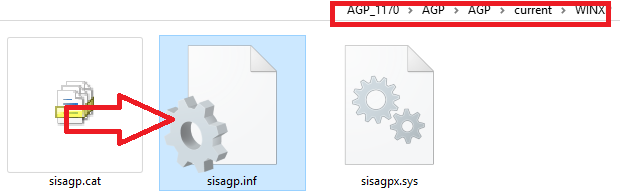
6. select the sisagp.INF file in the extracted driver file : Located in AGP_1170 -AGP -AGP - current -WINXP

7. Continue with on-screen instruction until installation finish.

Jul 22, 2015

ASUS X452EA Windows 7 Drivers

ASUS release both Windows 7 and Windows 8 drivers for this model. You can also read the windows 10 upgrade guide asus official support site. So here is the drivers for windows 7 64-bit:

Chipset
AMD Chipset Driver
Download

Audio
Realtek Audio Driver
Download 

LAN/Ethernet
Realtek LAN Driver
Download

Touchpad
ASUS Smart Gesture Driver
Download

Hotkey
ATKACPI and related utilities
Download

Wireless
Choose one base on your specification or test which work for you:
Realtek Wireless LAN : Download
Qualcomm Atheros Wireless LAN : Download


Bluetooth
Choose one base on your specification or test which work for you:
Ralink Bluetooth Driver : Download
Qualcomm Atheros Bluetooth Driver : Download

Graphic Adapter/VGA
ASUS did not list the graphic drivers on their website. SO can can use the latest catalyst drivers from AMD website.
AMD Radeon HD 8210
Latest : catalyst 15.6 Beta : Download from AMD

Feb 11, 2012

ASUS Eee PC 900 Drivers - Windows 7

Asus Eee PC 900 originally design to work with windows XP. Asus did not provide Windows 7 support for this model in their website. However, not to worry because most of the drivers installed automatically in Windows 7.

The only problem you would have is the graphic driver. Here is how to install it in Windows 7 using your original Windows XP driver.

Driver - Graphic:
Intel GMA 915 Graphic Driver (915GM/915GMS)
Download this driver (original driver for windows XP)


Installation:
1. Extract the file, find igxpun.exe (setup file), right click on it and select PROPERTIES , then select COMPATIBILITY, Select 'run this program in compatibility mode for' Select Windows Vista.
2. Right click again on igxpun.exe and select 'run as admin'. Continue with on screen instruction.

If you get an error message when you try to install. try these method:

Guide to install Graphic 915GM/GMS

In case you need other drivers, select from the list below:

Driver- Wireless:
Atheros AR5001 Wireless Network Adapter


Driver - Audio
Realtek ALC662 High-Definition Audio
(your original driver contain vista driver, if your audio work no need for this driver, vista driver normally works for win 7)


Installation:

1. Extract the file, find asussetup.exe (setup file), right click on it and select PROPERTIES , then select COMPATIBILITY, Select 'run this program in compatibility mode for' Select Windows Vista.

2. Right click again on asussetup.exe and select 'run as admin'. Continue with on screen instruction.


Driver  - ATK
Advanced Configuration and Power Interface Driver (enable your fn key)
Version V4.00.0010 645kb (I recommend to run as admin)


LAN/Ethernet
Atheros L2 Fast Ethernet Controller
Atheros Atc002 Fast Ethernet 10/100Base-T Controller
(there are no issues so far for LAN (function to enable wired connection on LAN port) , so you can skip this driver unless you sure you need this one.


Guide to install:
1. Extract the file we will use it later.
2. Open device manager by - click start and type DEVMGMT.MSC and press enter.
3. Right click on network controller (make sure you install wireless first, because both LAN and wireless normally represent as Network with !/? mark on device manager.) and select UPDATE DRIVER.
4. Select Browse my computer for....... then click BROWSE and point to the driver folder we extracted earlier. Continue until installation finish.

If you does not know if there any drivers still missing, read my guide on How to :Check drivers in windows 7 .

Enhancement - Aero
Aero only supported INTEL 965 Graphic series and above, so by installing the driver it won't enable the Aero. You can install third party software to get Aero such as 'true transparency'.

Feb 8, 2012

ASUS A43SJ Windows 7 Driver

This driver i selected among the drivers listed by ASUS. There are many version and utilities, including BIOS and BIOS Utilities. However i listed only the important driver (essential). The thing that i've been thinking in thier specs it show it is Nvidia 520 graphic while on the promotion page it said ATI 6310M? but on the download page only Nvidia Driver available. I'm aware that there are a lot of As43J series. If in case there are drivers incompatible leave your comments below.

Apllicable for:
Windows 7 32-bit
Windows 7 64-bit

Chipset
1. Intel Chipset Installation Utility: Download
2. Intel Rapid Storage Technology : Download
3. Intel Turbo Boost : Download
4. Intel Management Interface (MEI) : Download


ATK
ATK Driver For windows 7
ATKPackage_Win7_32/64_Z100010.zip - 8 MB
Download

AUDIO
Realtek High Definition Audio Driver
Download

VGA
NVIDIA® GeForce® GT 520M with 512MB/1GB DDR3 VRAM
Download

You can also download this driver via Nvidia website here:
 http://www.geforce.com/drivers

Then fill the field with these info:
Geforce
Geforce 500M series (notebook)
Geforce GT520M
WIndows 7/x64
English
Start search and download the available drivers

LAN
Realtek fast ethernet driver
Download 

Card Reader
Realtek Card Reader Driver
Download

TouchPad
1. ALPS Touchpad Driver (Elantech) :
Download

2. Synaptic Touchpad Driver (Azuware)
Download

USB
USB 3.0 Driver for windows 7
Download

Wireless
1. Intel Wireless Utility  + Driver : Download
2. Azuware Wireless Driver : Download

BlueTooth

1. Intel Bluetooth Driver
Download (32-bit and 64-bit)

2. Azuware Bluetooth Driver
Download (32 and 64 bit)

Camera
Azuware Camera Driver
Camera_Azurewave_VS010_Win7_32/64_Z5854000208.zip
Download